


Walmart: Shopping & Savings
4.7583.02K Reviews
App Specs
- Version
- 26.40.1
- Updated On
- License
- Free
- Downloads
- 100,000,000+
- Developer
- Walmart
- Categories
- Shopping
- Platform
- Android, iOS
Screenshots







 Analysis by AppCompare
For me, Walmart’s app is most useful when a shopping trip involves more than one kind of errand: groceries, household basics, and the occasional replacement item can all be handled in one place. That breadth is its clearest advantage, though it also means the experience is strongest when you already know what you need. I’d recommend it to people who shop at Walmart regularly and want to plan, compare, and arrange orders from their phone; it is less compelling if your priority is browsing a specialist retailer or choosing a store solely for a particular delivery experience.
One app for a mixed shopping list
Walmart is a shopping app from Walmart, and the appeal is practical rather than flashy. It is free, rated for Everyone, and has a 4.7 average from around 6.6 million ratings. Its reach is reflected in over 100 million installs, but those numbers matter less than whether it fits your routine: if your list includes food alongside cleaning supplies, school items, or a cable you need to replace, keeping those searches together can save time.
A realistic use is planning a weekly grocery order while adding a few non-food essentials as they come to mind. I’d build the list in stages instead of trying to remember everything at checkout: add pantry items when the cupboard runs low, then review the full basket before choosing how to receive it. That last review is useful because a broad catalog can make it easy to add an item you don’t actually need, especially when browsing deals.
Guides and Analysis on Walmart: Shopping & Savings
Where its convenience has limits
Convenience depends on the item and the way you shop. Search is helpful when I have a clear product name, but online results still require a careful look at size, model, and other details. For groceries, I’d pay attention to the item description rather than relying on a familiar-looking image. For electronics, I’d compare the specifications and read customer feedback before deciding; having plenty of choice is useful, but it can also make a quick purchase less straightforward.
Pickup and delivery are valuable alternatives to walking the aisles, but they are not interchangeable with an in-person visit. If I need to inspect produce myself, make a last-minute substitution, or browse without a fixed list, shopping in store may suit me better. And if timing matters, I would check the order details before counting on an arrival window: an app can make ordering easier, but it cannot remove the practical uncertainty that comes with getting an order from a store to your door.
Who I’d recommend it to
The strongest fit is a regular Walmart shopper who wants to combine categories, prepare a list, and choose between shopping in person, pickup, or delivery. The app can also help occasional shoppers who know what they are looking for and want to check products before heading out. If you rarely shop at Walmart, prefer a small specialist selection, or want to compare several local stores in one place, another retailer’s app may be a more natural starting point.
Walmart’s current version is 25.49.1, and the app has been available since May 6, 2011. I see that long-running presence as context, not a guarantee that every screen or order will suit everyone. The useful test is simple: try it for a familiar, low-pressure shopping list, then decide whether its mix of browsing and fulfillment options matches how you actually shop.
Worth Reading Before You Choose

QuizzLand Review: A Good Fit for Short Trivia Breaks, Not Every Player

Basketball Stars: Multiplayer Is Fast, but Can It Recover When Matches Go Wrong?

WEBTOON Turns Phone Updates Into a Better Reading Routine

Link to Windows Runs on Shared Habits, Not Social Feeds

How Alibaba.com Dominates the B2B Marketplace

Metro's Quiet Rise: Redefining Mobile Communication
Your One-Stop Shop
The first thing that stands out with the Walmart: Shopping & Savings app is its sheer convenience. From groceries to gadgets, you’ve got everything at your fingertips. It’s like having a mini Walmart in your pocket. The search function is pretty slick, making it easy to find whatever you need without endlessly scrolling. And trust me, that's a blessing when you're in a hurry.
Deals and Savings Galore
Who doesn’t love a good deal, right? With this app, you get access to special savings and discounts that are sometimes exclusive to app users. It's like being part of a secret club where you’re constantly in the loop about the best prices. There’s a section for rollback items, and markdowns that’ll have you doing a happy dance. Plus, the savings catcher feature ensures you’re getting the best deal possible by comparing prices with local competitors.
Easy Peasy Shopping Experience
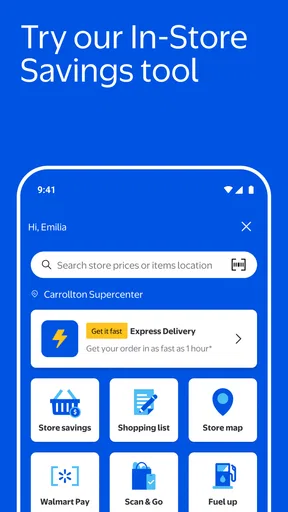
Navigating the app is a breeze with its user-friendly interface. You can create a shopping list, and even set up notifications for when your favorite items are back in stock or on sale. It’s like having a personal shopper who knows your preferences. The barcode scanner is a nifty tool, allowing you to scan items in-store to check prices and availability.
Pickup and Delivery on Point
One of the standout features is the flexibility of pickup and delivery options. You can order groceries online and pick them up curbside, or have them delivered straight to your door. The app keeps you updated on your order status, so you’re never left wondering. Plus, the delivery is usually pretty prompt, which is a huge plus if you’re on a tight schedule.
All About That Tech
For tech enthusiasts, the app doesn’t disappoint. It offers a wide range of electronics at competitive prices. Whether you're upgrading your TV or looking for the latest smartphone, the app has got you covered. The detailed product descriptions and user reviews help you make informed decisions, which is super handy.
Overall, the Walmart: Shopping & Savings app is a solid choice for anyone looking to streamline their shopping experience. It’s packed with features that save time and money, and who doesn’t want that? Whether you’re a regular Walmart shopper or just love a good bargain, this app is worth checking out. Happy shopping!
Making a basket that stays manageable
The app’s range is an advantage, but I find it works best when I treat it as a planning tool rather than a place to wander indefinitely. Search by the exact brand or product type when you can, then check the listing before adding it. A quick review of quantities and package sizes matters when buying household staples: a lower-looking price may refer to a different amount than the one you usually bring home. This simple check makes a mixed basket easier to judge and helps avoid filling it with near-matches.
For a busy weekday, I might add milk, breakfast items, and cleaning supplies to one list, then return later to check what is actually running low. That pause is a useful habit, not wasted effort. It gives me a chance to remove duplicate items and decide which purchases are urgent. If I’m only missing one ingredient for dinner, a full online order may be less convenient than a quick local trip; the app is most valuable when the list is large enough to justify organizing it.
Use the tools with a little intention
The barcode scanner is particularly useful for a decision I’m already making in the aisle. I can scan an item to check its price and availability rather than guessing from a shelf label or trying to locate it through a broad search. I’d use it as a quick reference, then confirm the product details on screen; scanning can identify a listing, but it does not decide whether that size or version is the right one for me.
Lists and notifications can also reduce the need to repeatedly search for routine purchases. I’d keep a list for recurring household needs and use alerts selectively for items I genuinely want to watch. If every possible sale triggers attention, notifications become noise rather than help. The practical benefit comes from treating these tools as reminders for a short set of priorities, not as a reason to monitor the app throughout the day.
Deal browsing calls for the same restraint. Rollbacks and markdowns can make it easier to spot a lower price, but a discount is only useful if the product was already on my list or is a sensible replacement. I wouldn’t assume that a promotional label means an item is the best choice for every shopper. For a more expensive purchase, especially electronics, I’d compare the specifications and reviews as well as the price, and take time to check that the model matches what I need.
Choosing between pickup, delivery, and the aisle
Pickup makes the most sense to me when I have a planned basket and want to avoid walking through the store. Delivery is more appealing when getting there is the main obstacle, such as during a packed workday or when carrying a large shop home would be awkward. In either case, I’d choose the method based on the job rather than assuming one is always faster. The app can organize an order and show its progress, while the actual convenience still depends on the practical details of receiving it.
If I am buying fresh food for a meal where appearance or ripeness matters, I may prefer to select it myself. If I’m restocking familiar packaged groceries, pickup or delivery can be a better fit. That distinction is useful because it avoids expecting an online order to reproduce every part of browsing in person. I also like having the store option when I want to make an immediate choice or add something after seeing what is on the shelf.
Compared with a grocery-only app, Walmart’s main advantage is the ability to put food and general merchandise into the same shopping plan. A specialist grocery service may feel more focused if produce selection is the whole point of the trip, while a dedicated electronics retailer can be easier to navigate when I’m comparing technical products in depth. Walmart is the broader, convenient option; it is not automatically the best specialist for every category.
A sensible way to decide if it fits
I’d start with an ordinary, familiar list rather than making the first test a complicated order with unusual products. Search for the items I buy regularly, compare the descriptions with what I need, and see whether creating a list makes the next shop easier. Then I’d decide whether pickup, delivery, or an in-store visit suits that particular basket. This gives a clearer impression of the app’s usefulness than browsing deals without a plan.
Walmart has been free to use and has been available since May 6, 2011, with its current version listed as 25.49.1. The scale of its audience is substantial, but I would not treat popularity as proof that the workflow will suit my habits. What matters is whether its mix of categories and shopping methods saves me effort on the errands I actually make.
My recommendation is for people who already shop at Walmart and want one place to plan everyday purchases, check products, and arrange a store visit or an order. I’d skip it as a primary shopping tool if I need a highly specialized catalog, want to compare many retailers at once, or prefer to choose every grocery item in person. Used with a clear list and a little attention to product details, it can make routine shopping more organized; used as an endless deal feed, it is easier to lose time than save it.
Pros
- Wide range of products available.
- User-friendly interface for easy navigation.
- Convenient online grocery delivery service.
- Frequent discounts and rollback offers.
- Multiple payment options
- including digital wallets.
Cons
- Occasional app crashes during checkout.
- Limited availability in some regions.
- Inconsistent customer service experience.
- Some items may have delayed shipping.
- App notifications can be overwhelming.
FAQs for Walmart: Shopping & Savings
What features does the Walmart: Shopping & Savings app offer?
The Walmart app provides a comprehensive shopping experience, including online shopping, price checking, and in-store pickup. It also offers savings with the Savings Catcher feature, pharmacy services, and the ability to manage Walmart Pay. Users can create shopping lists, find store locations, and track orders easily from their smartphones.
How does the Savings Catcher feature work?
The Savings Catcher feature allows users to scan their receipts to compare prices with local competitors. If a lower price is found elsewhere, the app credits the difference to the user’s Walmart account. This helps ensure that you're always getting the best deal available, maximizing your savings effortlessly.
Is Walmart Pay secure to use?
Yes, Walmart Pay is designed with security in mind. It uses advanced encryption and authentication techniques to protect your payment information. Additionally, your card details are never stored on the device, reducing the risk of unauthorized access. It's a convenient and safe way to pay in-store using the app.
Can I use the app for pharmacy services?
Absolutely. The Walmart app allows users to refill prescriptions, transfer prescriptions, and manage pharmacy accounts with ease. You can also set medication reminders and browse the Walmart pharmacy’s selection of health products. This makes managing your health needs convenient and streamlined.
What are the benefits of using the app for grocery shopping?
The Walmart app simplifies grocery shopping by allowing users to order groceries online for delivery or curbside pickup. You can browse the extensive selection, track your orders, and even use the app to find items in-store. This flexibility makes it easier to fit grocery shopping into your busy schedule.


